Back home

Portfolio section

Art Tooling

Designing tools for designers · Internal tools, editor extensions and production workflows created to make design work faster, clearer and easier to validate.

Scroll

Art Tooling

Capture 360 Screenshots

A Unity Editor tool for generating production, clay and wireframe 360° captures.

Problematic

Problematic

A simple task with an unnecessarily complex workflow

I needed a fast way to export 360° images directly from Unity for portfolio presentations, environment reviews and production breakdowns. The free tools I found were either unintuitive, too limited or required fragmented workflows, while more complete alternatives were paid. I therefore designed a focused editor tool around the actual needs of an environment artist.

  • Multiple visual passes were required.
  • Existing workflows lacked clear feedback.
  • Capture settings were scattered or overly technical.
Wireframe

Wireframe

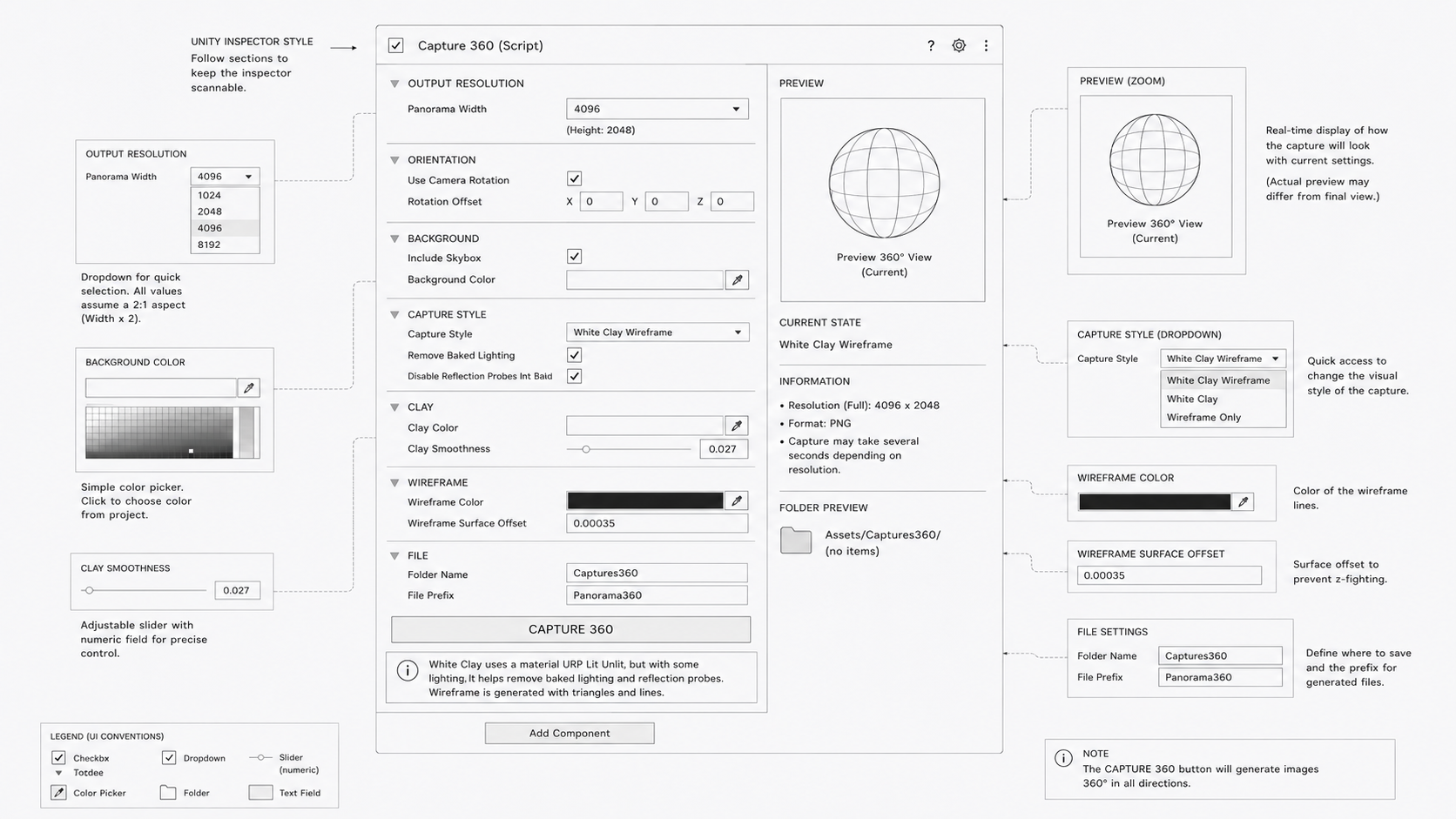
Designing the capture workflow

The interface was organised around the order in which the user makes decisions: output resolution, camera orientation, background, capture style and export settings.

  • Output resolution
  • Camera orientation
  • Background settings
  • Capture style
  • Export settings
  • Reduced visual noise for non-technical users.
Integration

Integration

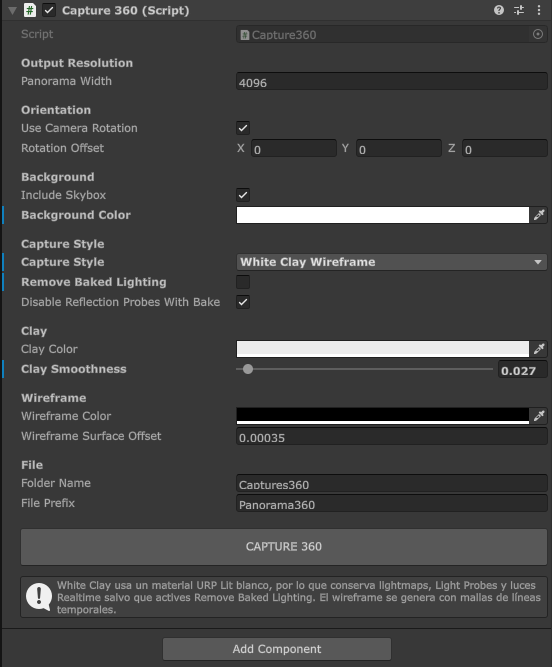
Integrated as a focused Unity Editor component

The final tool is exposed through a custom Unity Inspector, grouping the configuration into clear and predictable sections. Options dynamically adapt to the selected capture style, keeping the interface compact while still supporting multiple production outputs.

  • Configurable panorama resolution.
  • Camera rotation and orientation offsets.
  • Optional skybox or custom background colour.
  • Multiple capture styles: production, clay and wireframe.
  • Optional removal of baked lighting.
  • Wireframe capture with configurable line thickness and colour.
  • Configurable output folder and gile prefix.
  • Contextual warnings before capture.
Showcase

Showcase

One tool, multiple production views

The tool generates presentation-ready 360° captures directly from the Unity scene, including final rendering, clay and clay-wireframe views. This makes it possible to document both the visual result and the underlying environment construction without leaving the editor.

  • Production panorama
  • White clay panorama.
  • White clay + wireframe panorama.

Art Tooling

Procedural UI Generation Tool

A Unity tool designed to bridge design and development by generating flexible, sprite-free interfaces directly inside the engine..

Problematic

Problematic

UI implementation was breaking the design workflow

Translating interface designs into Unity required exporting, organising and repeatedly updating large numbers of sprites. Even minor visual changes could create additional production work, while animations, states and transitions often had to be recreated manually by developers.

  • Design changes required repeated sprite exports.
  • Visual properties were difficult to adjust after integration.
  • Designers and developers worked with different representations of the same interface.
  • States and transitions required additional implementation work.
  • Sprite-heavy workflows reduced flexibility and scalability.
Wireframe

Wireframe

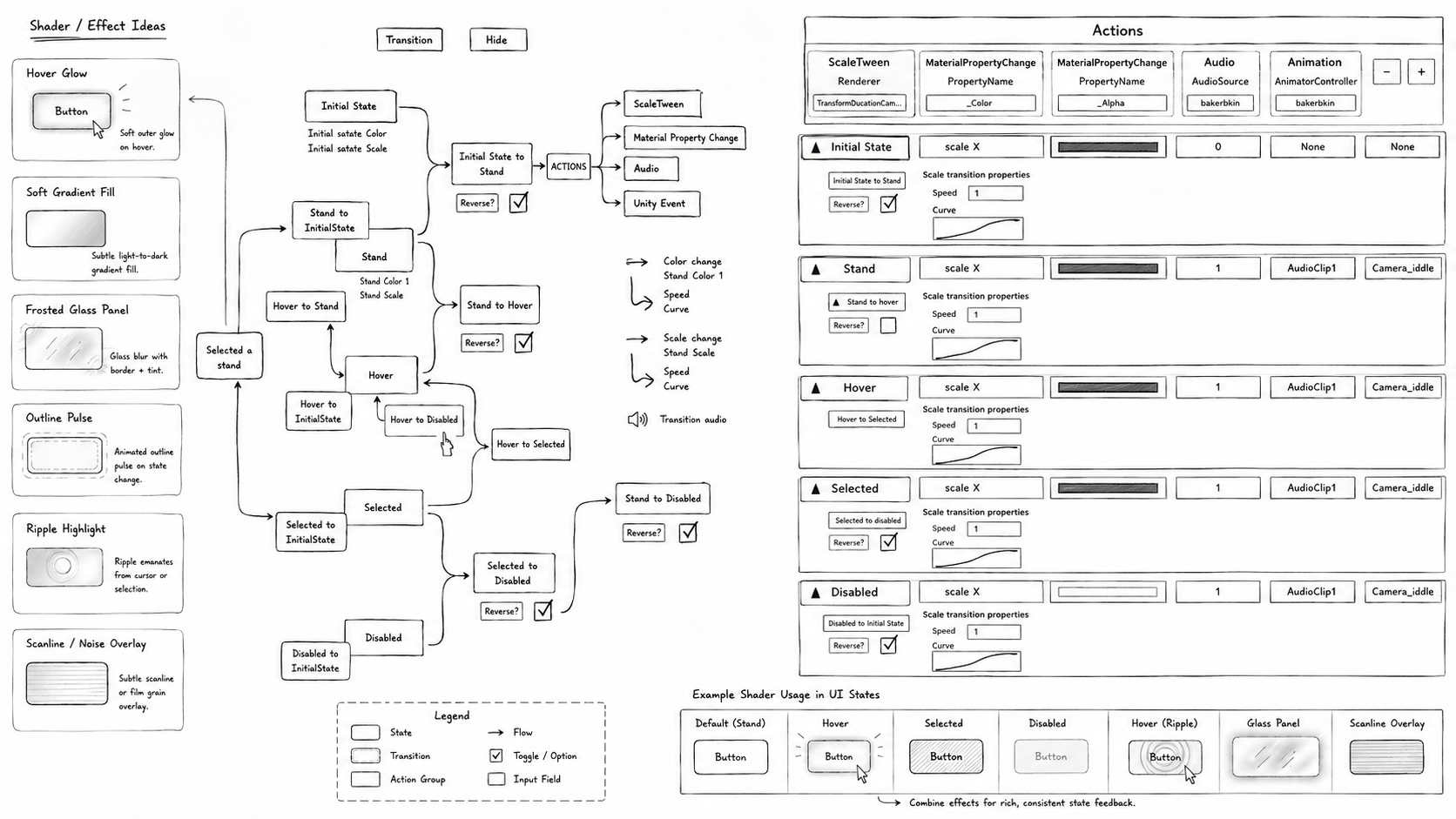
Defining a shared visual language for UI

The tool was structured around reusable visual properties instead of fixed image assets. Designers could define the appearance and behaviour of each element through parameters that could be reproduced directly inside Unity.

  • Shape and corner configuration.
  • Fill and outline properties.
  • Colour and transparency controls.
  • Linear and radial gradients.
  • Reusable visual states.
  • Animation and transition settings.
Integration

Integration

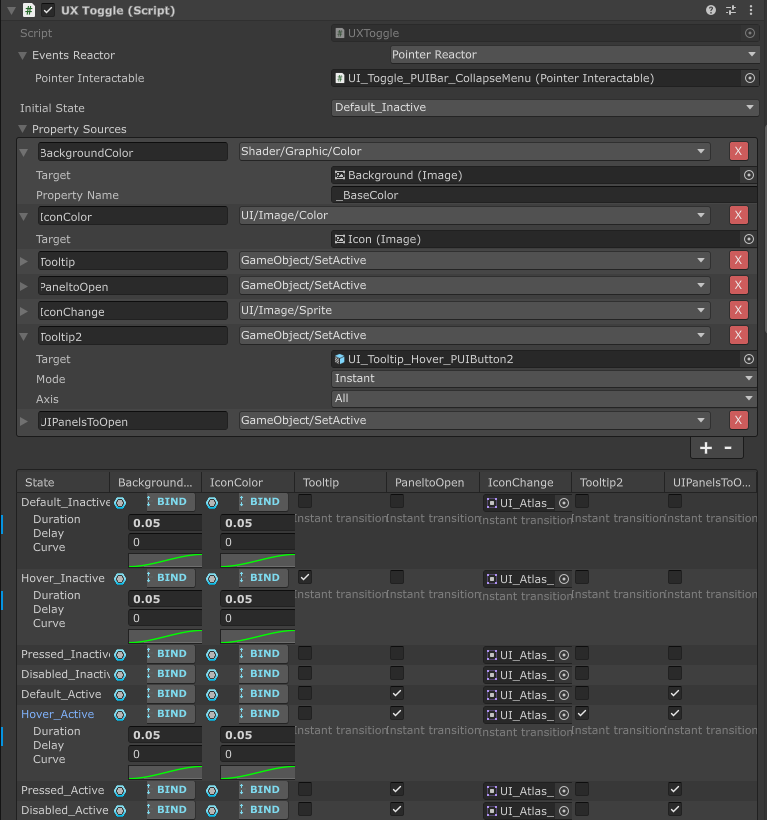
Generating interfaces directly inside Unity

This integration was coded by Andrés Espino. The final workflow allows interface elements to be created and adjusted natively in Unity without relying on exported sprites. Visual properties remain editable throughout production, making it easier to preserve design intent while adapting the interface to different contexts and interaction states.

  • Sprite-free interface generation.
  • Editable colours, shapes and opacity.
  • Configurable gradients and visual effects.
  • Reusable components and presets.
  • State-based styling.
  • Integrated animations and transitions.
  • Runtime and Editor compatibility.
  • Faster iteration between design and development.
Showcase

Showcase

From design rules to production-ready UI

The tool creates a more continuous workflow between design and implementation. Instead of rebuilding static assets after every change, teams can iterate through shared parameters, preview behaviours directly in context and maintain a consistent visual system across the application.

  • Faster design iteration.
  • Fewer asset export and import cycles.
  • Greater visual consistency.
  • Easier adaptation across screens and states.
  • More autonomous work for designers.
  • Clearer communication with development teams.